Worklogs
12.10.2026. По запросу владельца создан проект newpg.ru в fi1osof.ru и поставлена задача возродить сайт веб-студии. В проект внесены исторические сведения о «Новой парадигме», ранних технических статьях, утрате прежнего сайта и профессиональной цепочке MODX.club → Prisma CMS → Freecode Academy с современными направлениями fi1osof.ru / haih.site. Подготовлена постановка с аудитом исторических URL, разработкой, тестированием и критерием фактического запуска. Разработка и публикация сайта пока не выполнялись.
Сайт запущен
Recording the launch of the first three sites retroactively:
Original worklog from 10/07/2026.
Configured a basic in-house analytics system for already launched websites: collection of client-side events via JavaScript and matching them with server logs. This allows separate viewing of activity from real users, search engine bots, monitoring tools, scanners, and other technical traffic. A foundation has been laid for future anti-fraud filters and measurements of load and cost before and after filtering.
Two articles about the project have been published:
- https://как-продвинуть-сайт.рф/blog/pochemu-ya-zapuskayu-etot-eksperiment — why the experiment with at least 50 sites was launched: the previous organic traffic model is no longer working, so a practical search for new ways of independent promotion is needed.
- https://как-продвинуть-сайт.рф/blog/svoya-analitika-i-antifrod — on proprietary analytics and anti-fraud: how to distinguish real users from bots and technical traffic, correlate client events with server logs, and measure the real cost of traffic.
Already indexed 1700+ pages
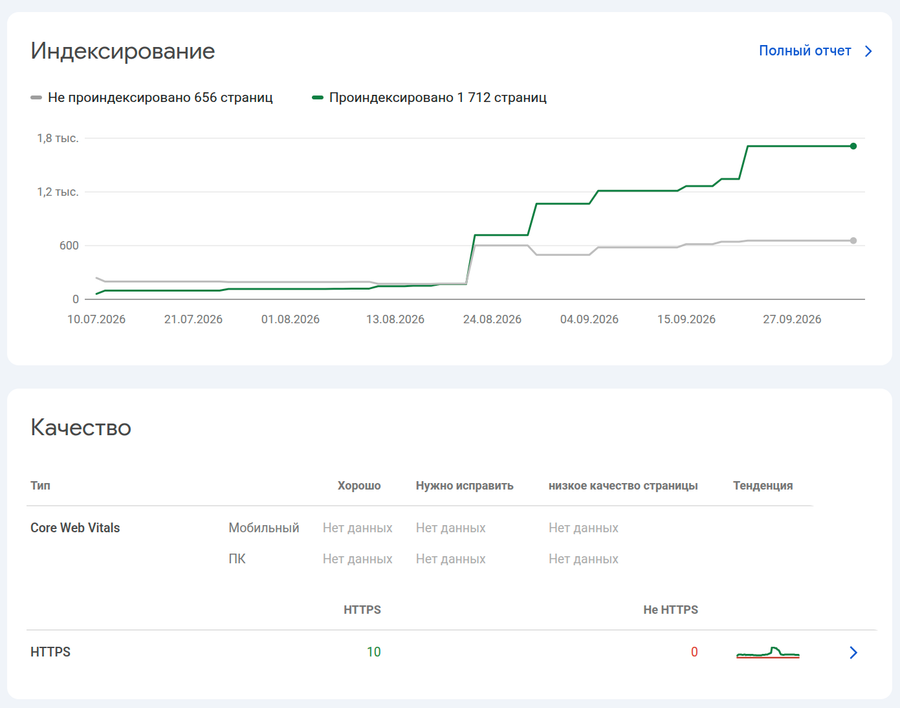
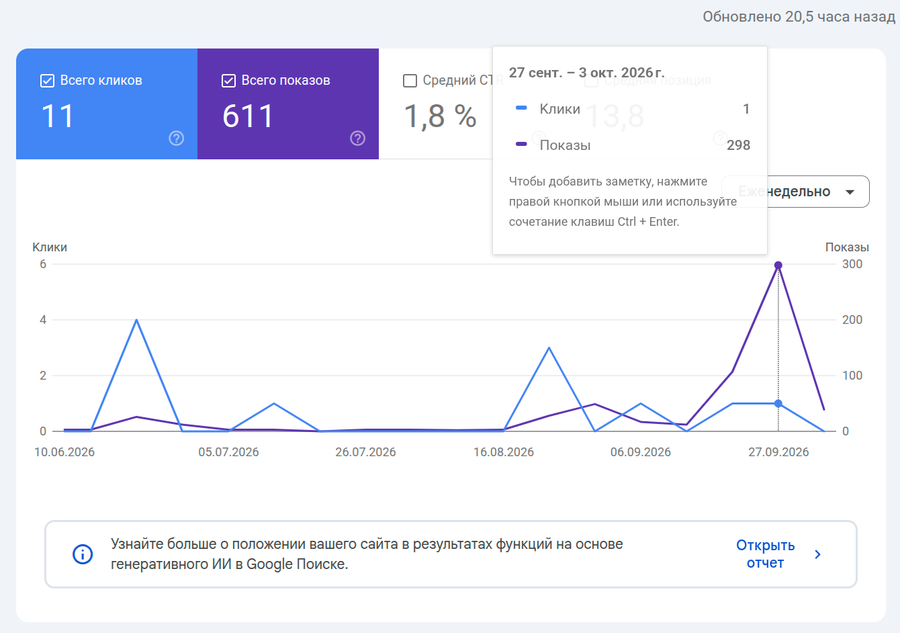
Impressions are growing, clicks are not.
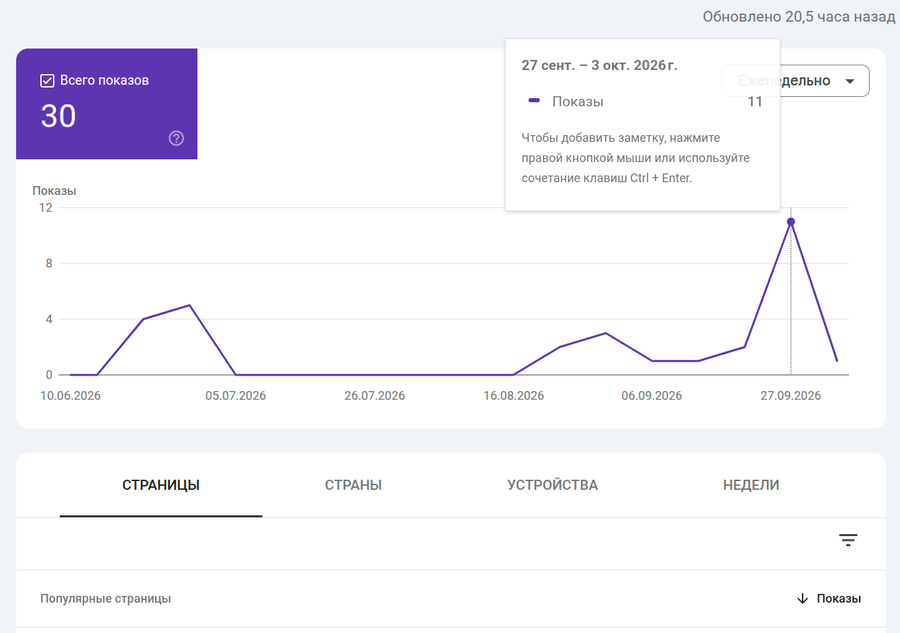
Generative SERP is weak.
Already 7,500+ pages indexed
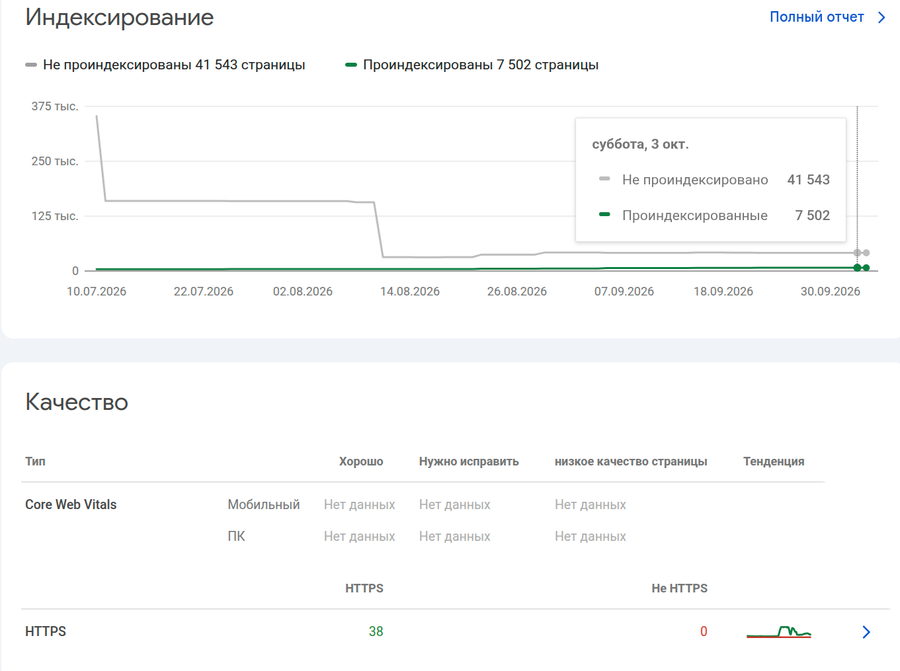
Yet over the past month, still not a single new page in search results.
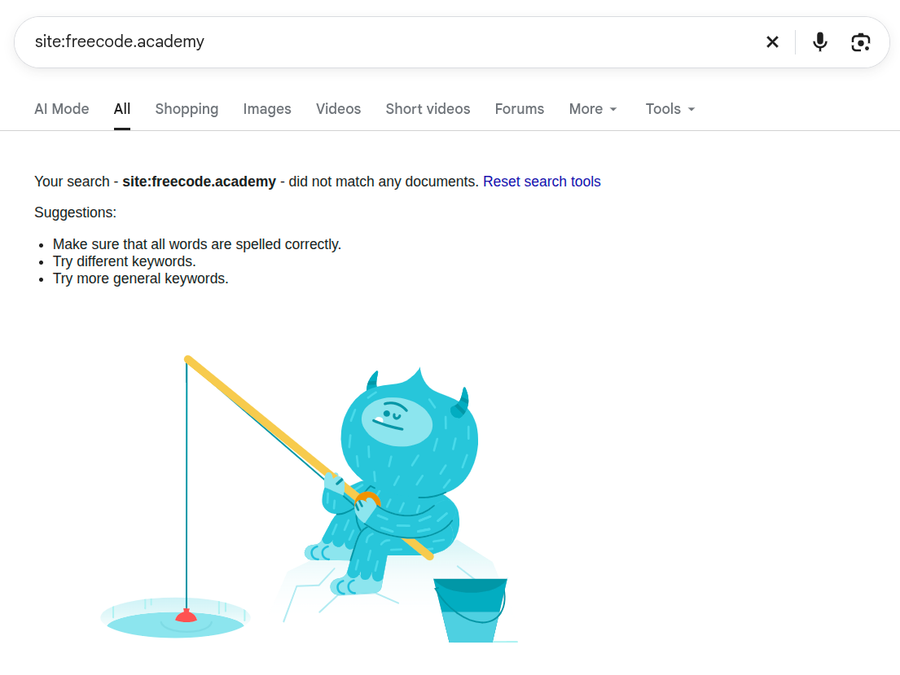
and over the year — only two.
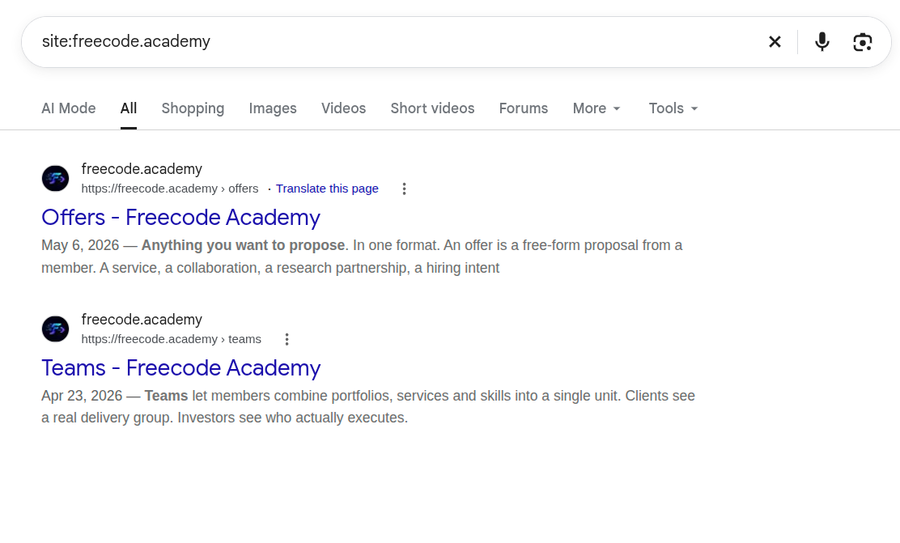
Two pages in a year, seriously.
Clicks/impressions are actively dropping.
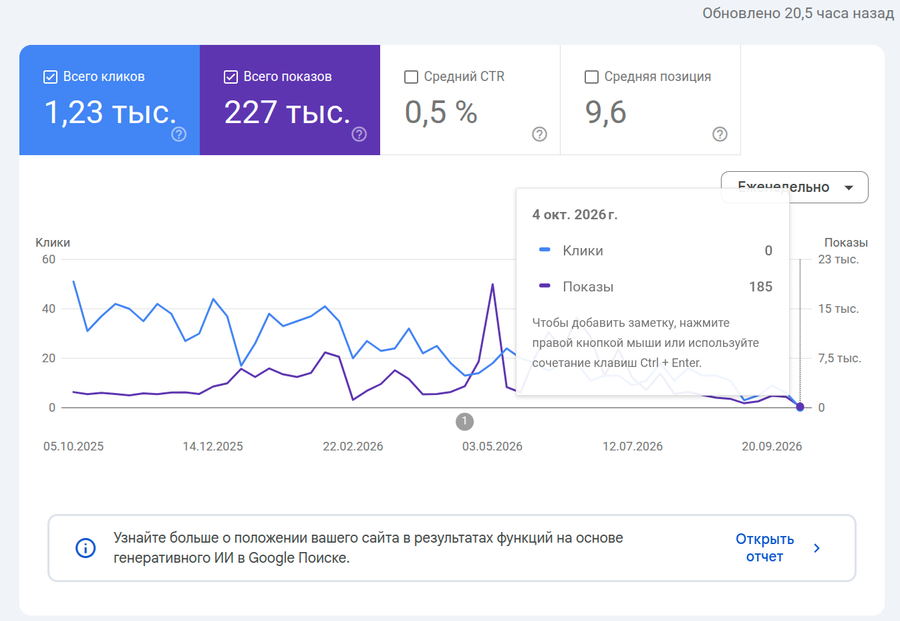
Generative search results — unclear.
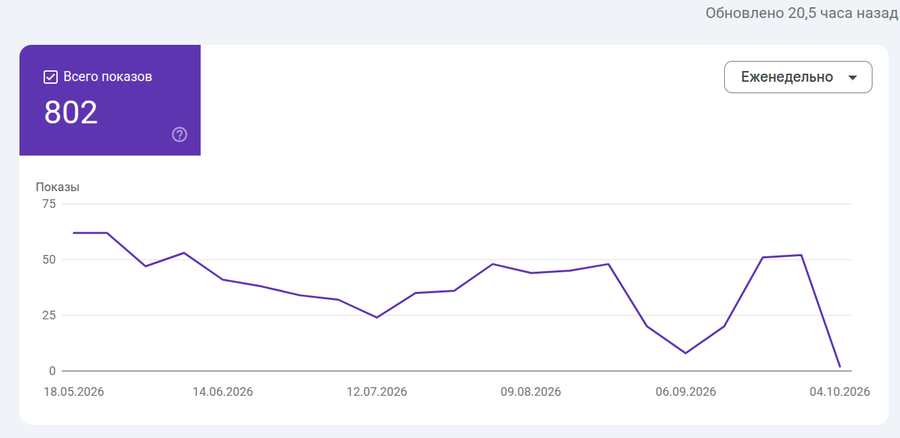
By the way, pay attention to the anomalous spike in impressions in May. It was grouped by weeks, now I'm breaking it down by days. This is primarily a standalone surge in search results for a single day — almost 7,000.
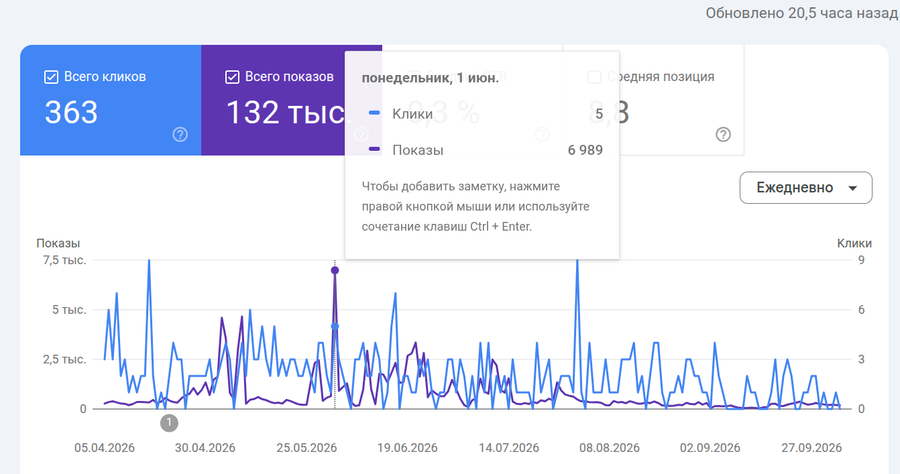
And no, this does not correlate with clicks at all. Let's look at impressions alone:
A week earlier, 220 impressions; a week later, 157 impressions, and here — almost 7,000. That's a difference of more than 15 times. There is no such anomaly in clicks.
Who wants to explain this as anything other than automated activity? That is, the number of impressions and clicks is long past being about "how many real people saw and visited us".
The website kak-prodvinut-sayt.rf has been moved to a separate project: /projects/cmuymjnak0106nw0p28llboa4.
The website kak-prodvinut-sayt.rf was actually created and launched as part of the general worklog: /worklogs/cmuy98sq801pcnw0qakldqkfd.
Today, 3 websites were created and launched:
The work was performed by the agent under the user's supervision: website creation, content population, infrastructure configuration, setup of two separate new servers, publication, and website launch. Thus, a significant part of the full cycle has already been refined — from website task definition and assembly to server configuration and deployment to production.
After several hours of experimenting with the new planning system, I gained a much better understanding of both the limitations of the current implementation and the limitations of the AI-agent-driven development approach itself. The agent implemented some parts successfully, but overall the system does not yet meet my requirements, and further local fixing of individual issues is no longer efficient.
Particularly revealing was the attempt to regress and simplify the system. The agent was explicitly instructed which parts of the implementation should be removed or simplified, but along with them, it also touched other elements that were supposed to be preserved. This highlighted an important limitation: the agent is capable of working with individual fragments and local dependencies, but struggles to maintain the boundary between targeted simplification and the destruction of interdependent behavior. When a system consists of several interconnected subsystems, locally sensible changes can disrupt connections that were not explicitly described in the current context.
This leads to a more general conclusion about AI-assisted development. If an agent starts repeatedly fixing the consequences of its own previous changes, continuing such a cycle quickly leads to an accumulation of code, workarounds, and implicit dependencies. At some point, the problem is no longer a specific bug, but the loss of a simple and verifiable model of the system. Trying to task the agent with deep refactoring in such a state carries the risk of further increasing complexity: it may correctly optimize individual sections without understanding which properties of the entire system must remain unchanged.
Therefore, the development phases need to be rethought. Probably, the main object of control should shift from the internal implementation to the external behavior of the system: requirements, invariants, scenarios, tests, and relationships between subsystems. If the implementation ceases to meet these requirements and the agent cannot quickly return it to a correct state, it may be more advantageous not to continue the endless repair-loop, but rather to fix the desired behavior, simplify the model, and rebuild the implementation from scratch. In other words, code in such a process should be viewed more as a replaceable artifact rather than an asset that must be preserved at all costs and patched up gradually.
The experiment proved useful precisely because it revealed the limit of local AI refactoring: it is difficult for the agent to independently determine where permissible simplification ends and the destruction of system relationships begins. The next stage of work should be built around a more explicit specification of behavior and subsystem boundaries, rather than around further fixing the already accumulated implementation.
Here is what ChatGPT says:
Yes, a request abortion in the browser can lead to the cancellation of generation at the provider's end — if your backend links these two connections and passes the cancellation downstream. However, the lack of streaming response support in modern Chrome is an unlikely cause: fetch() supports reading responses via ReadableStream. MDN
Here we need to separate two segments: browser → your server and your server → provider. If the browser aborted the request, the server can cancel the request to the provider using AbortController. In that case, the error handler might indeed mistake this cancellation for "the provider interrupted the generation." The error text alone does not prove who aborted the connection first. Cancellation via AbortSignal can terminate an HTTP request with an AbortError. Node.js v26.10.0 Documentation
You can check API availability directly in the browser console:
const supportsResponseStreaming =
  typeof fetch === 'function' &&
  typeof ReadableStream === 'function' &&
  typeof Response === 'function' &&
  'body' in Response.prototype &&
  typeof ReadableStream.prototype.getReader === 'function';

console.log({ supportsResponseStreaming });
This checks support for reading a streaming response. There is no separate browser function called "HTTP Streamable supported"; if we are talking about a regular request with JSON and a streaming agent response, this exact capability is needed. Streaming request body sending is a different capability with its own limitations. MDN
But true does not guarantee that the stream passes normally through the entire chain. For this, you need a test endpoint on your server that sends, for example, five messages at one-second intervals, and a check in the browser:
async function testStream(url) {
  const started = performance.now();
  const response = await fetch(url, { cache: 'no-store' });

  if (!response.ok) throw new Error(`HTTP ${response.status}`);
  if (!response.body) throw new Error('No response body');

  const reader = response.body.getReader();

  try {
    while (true) {
      const { done, value } = await reader.read();
      if (done) break;

      console.log({
        elapsedMs: Math.round(performance.now() - started),
        bytes: value.byteLength,
      });
    }
    console.log('Stream completed');
  } catch (error) {
    console.error('Error reading stream:', error);
  } finally {
    reader.releaseLock();
  }
}

testStream('/api/stream-test');
The address here is conditional — the endpoint needs to be implemented. Reading via getReader() allows you to observe the arrival of response chunks. Network chunk boundaries do not have to match server message boundaries. MDN
Interpretation:
- Chunks arrive gradually — the stream is going through.
- Everything arrives in one chunk at the end — buffering is happening somewhere.
- Reading fails with an error — the connection or stream processing is broken; the cause requires correlation with the server log.
For your case, the decisive check is the order of events in the logs of a single request: client disconnection, calling request cancellation to the provider, provider response reading error. If the client disconnects first and then your code cancels the generation, the hypothesis is confirmed. If the stream from the provider is corrupted first, the cause lies in a different segment.
The "laptop / mobile" difference by itself only indicates a difference in conditions: network, VPN, extensions, frontend version, or its request cancellation logic. It is not possible to pinpoint a specific cause based on this sign alone.
Minimum Agent Event Model and LLM
A basic agent reaction layer has been implemented, suitable as a building block for the future runtime:
Agentclass andPOST /api/agentendpoint;- basic chain
message.received → Agent.react → message.publish; - connection between the action and the source event via
stimulusIdand its ownactionId; - JSON/NDJSON and a general cancellation mechanism;
Agent.reactnow calls the realrunChat/LLM instead of a mock;- successfully re-passed 2/2 agent tests for fragments/action identity, cancellation, and provider error.
The current implementation handles a single incoming event type and the chat channel; the model receives only the current message. There is currently no conversation memory, accumulation of multiple events, deduplication, general decision-making system, or scenario transition machine.
Runtime Foundation: Streaming Execution and Cancellation
A low-level execution mechanism has already been implemented for the upcoming proprietary dialogue runtime:
- a shared
ExecutionContextwith a run identifier, abort signal, and event delivery; - a streaming NDJSON contract
POST /api/chat; - correct started/delta/done/error/cancelled states;
- explicit execution cancellation as well as cancellation on disconnect/timeout/shutdown;
- independence of parallel runs;
- input and response size limits.
The HTTP layer has been re-verified with 8/8 tests.
This does not mean the scenario engine is ready: the declarative scenario model, nodes/branching, scenario versioning, persistent dialogue state, message idempotency, and atomic transitions are not yet implemented.
Integration of the existing website with the new agent center
Compatibility with the old chat interface of the neighboring agent project has been implemented:
- via
CHAT_AGENT_URL, the chat can be routed to the new agent, while without configuration, the previous path to n8n is preserved; - the adapter converts old client messages into new agent events;
started/delta/doneresponses are converted back to the oldbegin/item/endformat;- sliced UTF-8/JSON fragments, errors, incomplete streams, slow clients, and consumer disconnections are handled;
- related changes:
be06299,4fe6d85,c2a8ded.
Re-passed 3/3 local adapter tests.
Current limitations: this is a verification integration via the old interface, not a dedicated new embeddable widget. sessionId, the user token, and the page URL are not yet passed to the new agent; there is no visitor memory/context. The old website on port 3000 was not running during the last check, so a live end-to-end test through it was not re-verified.
HTTP chat and minimal agent event reaction
Server contracts have been implemented upon which the central dialog service can be built:
POST /api/chatsupports standard JSON and streaming NDJSON;- a unified
ExecutionContextcarries the execution id, response mode, abort signal, and event dispatch; - start, sequential delta, successful completion, error, and cancellation are supported;
- explicit cancellation via DELETE, cancellation on disconnect/timeout/shutdown, and independence of parallel runs are provided;
- the
Agentclass andPOST /api/agentwith themessage.received → Agent.react → message.publishchain have been implemented; - actions are linked to the stimulus via
stimulusId, and fragments of a single response share a commonactionId; - the reaction mock has already been replaced with a real call to the existing
runChat/LLM.
Re-checks from the audit: HTTP chat 8/8 tests, agent reactions 2/2 tests.
This is the foundation of the dialog component, but so far without persistent conversation memory, event deduplication, and a general model of sites/visitors/dialogs.
Server Foundation and LLM/API
Based on the actual project state, the core server layer of the agents center has been implemented:
- added GraphQL operations
llmChatCompletion,llmCompletion,llmImageGeneration,llmSpeechGeneration; - the common LLM client supports Local and OpenRouter, keys remain on the server;
- added a shared execution context and GraphQL WebSocket transport;
- GraphQL LLM operations are currently protected by active user authorization;
- implemented PostgreSQL/Prisma and the server-side account layer (
User,Token, registration, login, profile, sessions, JWT + stored session verification, bcrypt, session revocation); - added DB bootstrap and fixed production startup/build.
Related commits recorded in the audit: d3bea97, ea2c78e, b8ce41b, bc95738.
Re-verified locally: TypeScript checks successful, DB compliance with Prisma contract successful, connection to agents-center from the host and from the container successful, the new server on port 3001 responds with HTTP 200, via the proxy on 8080 also HTTP 200.
Important: persistent storage of conversations and full-fledged entities for sites/agents/dialogs/messages as a product layer are not yet completed.
Progress as of 09/30/2026
The performance and quality baseline for the old website has been measured and saved.
The following laboratory metrics were recorded for the homepage:
- Mobile Performance: 54 (median of 3 runs)
- Desktop Performance: 67
- Accessibility: 58 / 58
- Best Practices: 73 / 77
- SEO: 100 / 100
- Mobile LCP: 26.17 s (median)
- Desktop LCP: 4.56 s
- Resource size: approx. 4.83–4.87 MB
Four Lighthouse reports have also been saved. These are laboratory measurements, not field Core Web Vitals.
On the new HAIH, the old prerender that blocked the production build has already been eliminated, and a request-time SSR fallback has been implemented. However, optimization of images, JS/CSS, caching, accessibility, and the Traefik → Varnish → Node production path has not yet been completed, and repeated Lighthouse measurements for the new version have not yet been recorded.
The next control milestone is to measure the new homepage and key commercial pages under identical conditions and consistently bring Performance/Accessibility/Best Practices up to target values without degrading SEO.
Progress as of 09/30/2026
The current calculator has been analyzed and the issue has been confirmed with a reproducible scenario.
In the baseline version, the calculator can be used all the way up to the final contact request step: the user answers eight questions, but no price or other useful result is displayed before they enter their phone number and e-mail. This confirms the mechanism whereby the user first spends their time, and only receives the promised result in exchange for their contact information.
Desktop and mobile materials of the original interface, as well as the user scenario, have been saved, providing a baseline for comparing the new version.
The redesign has not yet been implemented. The next stage is to determine the minimum set of parameters that actually affect the cost, shorten the scenario, and display an estimated result before the mandatory contact request, followed by measuring not just "lead submitted", but also progress to the result and subsequent conversion.
Progress as of 09/30/2026
The preparatory phase of analytics and quality control has begun.
The old website baseline preserves browser scenarios, HTTP checks, robots/sitemap, four Lighthouse reports, a container resource snapshot, and material checksums. Current issues that are important to track as regressions have been documented.
Two old Google Analytics connections were found on legacy—a potential source of duplicate events. Part of the interface also depends on the presence of Yandex.Metrica.
The new implementation is already covered by technical checks: npm run types, npm run lint, npm run build, MySQL integration reading, 17 SSR/accessibility/routing tests, and browser navigation via legacy URIs without hydration errors.
Remaining tasks: inventory and migrate actual analytics goals/events, eliminate counter duplication, define lead generation events, check UTM/referrer, test form and lead delivery, and, after launch, monitor actual conversions, 404/5xx errors, and search engine accessibility.